
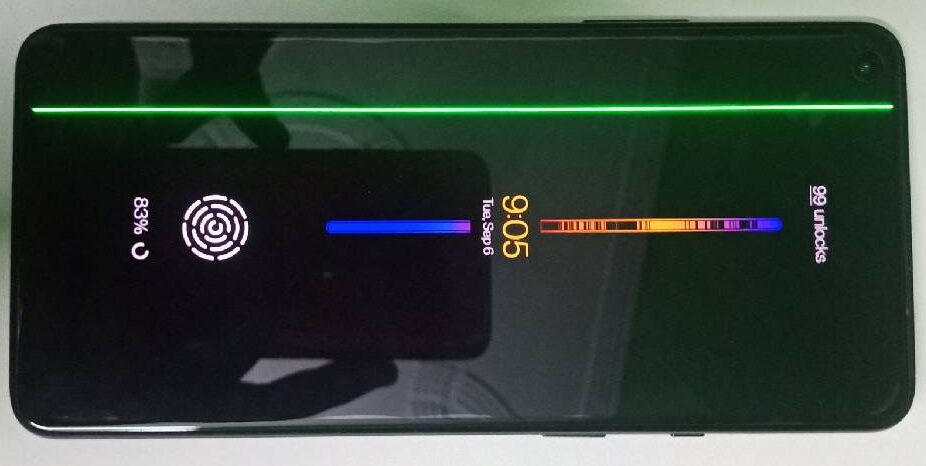
Smartphone Green Line Issue
Over the past few years, one problem that has become increasingly common in both budget and premium smartphones is the appearance of a green line (or sometimes a pink line) on the display. If you want to avoid this issue, it's important to follow a few precautions.
If you're active on social media, you've probably seen reports of green and pink lines appearing on the displays of flagship and expensive smartphones from brands like Samsung, Apple, and OnePlus. In fact, the issue became so widespread for OnePlus devices that the company had to offer a lifetime warranty for green-line issues on certain models to protect its reputation. However, not all brands provide such coverage, so users should take steps to prevent the problem themselves.
Avoid Overheating
A green or pink line often appears when the screen overheats. Heavy gaming, demanding tasks, or prolonged usage can cause a phone to become excessively hot. This puts stress on the display circuitry and may result in colored lines appearing on the screen.
Overheating can also damage other internal components. To prevent this:
- Stop using the phone if it becomes unusually hot.
- Turn it off and allow it to cool down if necessary.
- Avoid charging the phone under direct sunlight.
- Keep the device at normal operating temperatures whenever possible.
The better you manage your phone's temperature, the longer it is likely to last.
A Cheap Charger Can Cost You Dearly
Many people use low-cost third-party chargers with expensive smartphones. This can eventually contribute to display problems such as green or pink lines.
Cheap chargers often use lower-quality materials. While they may charge the phone, they may not manage heat and power delivery properly, increasing stress on internal components.
To reduce risk:
- Always use the original charger supplied by the manufacturer.
- If your phone doesn't come with a charger, buy an official charger from the same brand as your device.
Protect Your Phone from Drops
Frequently dropping your phone can also lead to display issues.
Even if no external damage is visible, a fall can loosen tiny internal components and connections. If this happens, display problems—including green or pink lines—may appear later.
To protect your device:
- Use a high-quality protective case.
- Consider using a shock-absorbing cover that can reduce the impact of accidental drops.
Keep It Away from Excess Moisture
Modern smartphones may be water-resistant, but prolonged exposure to moisture can still cause problems.
Over time, moisture can corrode display connection pins, causing certain pixels or display sections to stop functioning correctly. Using the phone in heavy rain or frequently handling it with wet hands may contribute to this issue.
To minimize the risk:
- Avoid prolonged exposure to water and humidity.
- Use a screen protector and a protective case.
- Dry the phone thoroughly if it gets wet.
Don't Update Your Phone While It's Charging
When a software update becomes available, many users plug their phones in and leave them charging while the update installs.
However, software updates can be resource-intensive and generate additional heat. If the phone is also charging at the same time, overheating may occur, potentially increasing the risk of display issues.
A safer approach is:
- Charge the phone first.
- Wait about 30 minutes after charging.
- Then start the software update.
This can help keep temperatures under control and reduce stress on the display.
Conclusion
To lower the chances of seeing a green or pink line on your smartphone screen:
- Prevent overheating.
- Use original chargers.
- Avoid dropping the phone.
- Protect it from moisture.
- Don't update it while it's charging.
While these precautions cannot guarantee complete protection, they can significantly reduce the risk of display-related problems and help extend your phone's lifespan.
Source: Navbharat Times